Every event name Lexitaire sends
This is the complete list, taken directly from the app's own analytics code — nothing held back. The browser version sends the same event names as the native app, plus two of its own (interstitial.shown, pwa.installed) for things that only make sense in a browser, minus one native-only event (orientation.changed — the browser doesn't reliably expose rotation the same way, so it isn't sent there).
app.launch
game.started
game.finished
gameLanguage.changed
appLanguage.changed
additionalGameLanguages.changed
learningLanguages.changed
word.checked
word.applied
wordCheck.opened
wordLookup.opened
wordsPlayed.opened
myGames.opened
help.opened
stats.opened
topScores.opened
settings.opened
reviewPrompt.shown
reviewPrompt.writeReviewTapped
reviewPrompt.rated
hint.used
tutorial.replayed
challenge.sent
challenge.accepted
duel.started
duel.turnSent
duel.turnReceived
duel.finished
screenshot.taken
screenshot.shareSent
soundEffects.changed
largeTiles.changed
statusBar.changed
tileStyle.changed
backgroundTexture.changed
backgroundImage.changed
boardSize.changed
timedGame.changed
timerDuration.changed
boardComparisonNotifications.changed
orientation.changed (native only)
premium.paywallShown
premium.purchaseStarted
premium.purchaseCompleted
premium.purchaseFailed
premium.trialGranted
premium.upsellShown
premium.upsellDismissed
premium.upsellOptedOut
interstitial.shown (browser only)
pwa.installed (browser only)
That's it — every signal is one of these fixed names. There's no free-text or dynamically-generated event name anywhere in the code.
What travels with each one
Every signal, regardless of which event it is, carries a few things in addition to the event name:
adsEnabled— whether this install shows ads (a stable per-device split, unrelated to any purchase)gameLanguages— which language(s) the board is currently dealt in, e.g."English,Español"— never which words were played, just which dictionarydeviceModel— a friendly device name (e.g."iPhone 16"), same as Settings/the App Store show — a human-readable companion to the SDK's own rawTelemetryDeck.Device.modelNameidentifier (e.g."iPhone17,1") shown further downisPremium— whether this install has purchased the Premium unlock, so any event can be segmented by ownership without a dedicated querydeviceLanguageCount— whether your device has more than one system language configured at all:"1"or"2+", never the exact count or which languagesmultilingualPlayer—"true"/"false", whether you've added an extra accepted game language on top of your primary one in Lexitaire's own Settings
One event is the deliberate exception to "coarse and bucketed" — word.applied sends the actual word you played and its exact score (not a bucket), specifically so board quality and average word length/score can be studied across languages. Everything else stays coarse:
word.applied→word(the exact word played) andscore(its exact score) — the one place exact values are sent, on purposegame.finished→durationBucket:<30s,30-120s,2-5m,5-10m,10-30m, or30m+— never the exact secondsgame.started→ board size, game mode (solo/challenge/duel/team), and whether/how long the timer is set to — all fixed labels, e.g."Classic", not raw numbers tied to a specific gameword.checked/wordLookup.opened→ which language matched — never the word itself (unlikeword.applied, this one only records success/language, not the word)- the various
*.changedsettings events → the new setting value (e.g. which tile material, whether sound is on) — nothing about the game being played when you changed it screenshot.taken→context:gameOver,midGame, orother— a guess at what was on screen (a just-finished game, one in progress, or something else, like Settings) based on the app's own state at that instant, never the screenshot image itself, which the app never has access to in the first placechallenge.sent→source:explicit(the Share button, or Top Scores' own Challenge button) orscreenshot(the screenshot prompt's offer)premium.trialGranted→source:challengeorduel— a Premium player challenged or duel-invited you, so you get to try Premium features for that one game. Fires once when the trial turns on, not again for every later turn of the same match.premium.upsellShown→milestone: the lifetime count of times you've been given a free Premium trial (e.g."5","15") — shown occasionally, on a backing-off schedule, to players who've tried Premium several times via a friend's Challenge/Duel but haven't bought it yetpremium.upsellDismissed/premium.upsellOptedOut→ no parameters beyond the shared ones above — sent when you tap "Maybe Later" or "Don't Ask Me Again" on that same prompt; the latter stops it from asking againorientation.changed→orientation:landscapeorportrait— fires only when the device is actually rotated mid-game, not on every relayout; distinct from theTelemetryDeck.Device.orientationfield below, which is a snapshot on every signal rather than a rotation count
Never sent, by any event: your name, an exact timestamp of when you played, or any hardware device identifier (IDFA/IDFV/UDID — Lexitaire never shows the App Tracking Transparency prompt because it never asks for one). Your IP address is never stored either — that's not Lexitaire's own code, it's TelemetryDeck's own documented policy: incoming IPs are only glanced at (the first three octets, for a country-level guess) and never written to a database or log file. The one exact value that is sent — word.applied's word and score — is deliberate and documented above, not an oversight.
Debug and Simulator builds never send anything at all, by a hard-coded guard in the code — only real App Store/TestFlight builds do.
What TelemetryDeck itself adds automatically
On top of what Lexitaire's own code sends, the TelemetryDeck SDK automatically attaches its own standard set of parameters to every signal — the same for every app that uses it, not something Lexitaire configures, and considerably more than just device/OS basics: an AppInfo block (app version/build), a Device block (model, architecture, OS version, screen size, timezone), a RunContext block (App Store vs. debug vs. TestFlight vs. simulator, locale), an SDK block (which SDK and version sent this), a UserPreference block (light/dark mode, region, language, layout direction), an Accessibility block (Reduce Motion, Bold Text, and similar system settings — whether they're on, never anything about why), a Calendar block (day of week/month/year, hour of day, whether it's the weekend — for aggregate time-of-day/day-of-week patterns, not tied to any one play), an Acquisition/Retention block (first-use date, session count, average session length), a session ID that resets each app launch, and a clientUser value: an opaque, per-install identifier TelemetryDeck generates to let a dashboard count roughly how many distinct people are using a feature, without it being your Apple ID, device serial number, or IDFA. Lexitaire's code never sets or overrides clientUser with anything of its own. The SDK also attaches around 19 deprecated flat-named duplicates of several of the fields above (e.g. a bare platform/isDebug/locale/region, alongside their namespaced TelemetryDeck.* equivalents) — kept only for older dashboards that predate the namespaced names, and omitted from the example below since they're byte-identical to fields already shown. For the complete, authoritative list, see TelemetryDeck's own documentation.
A real example (native app)
Here's an actual word.applied signal from iPhone/iPad/Apple TV, exactly as TelemetryDeck receives it (ID values shown are randomly generated per-install/per-session, not tied to any account) — every field the SDK attaches, not a trimmed-down excerpt. The outer [ ] is real too: the SDK batches whatever signals are queued into one array per HTTP request rather than sending each separately — this example just has one signal in it:
[{
    "appID": "EAF44E29-4BA0-44C8-8FB4-8FADF5639DEC",
    "clientUser": "0ecefd2c-3d40-4bac-863a-09d3e4988467",
    "sessionID": "14381279-9ee4-4880-a255-73268e4b5449",
    "type": "word.applied",
    "payload": {
        "TelemetryDeck.AppInfo.buildNumber": "8",
        "TelemetryDeck.AppInfo.version": "4.1.0",
        "TelemetryDeck.AppInfo.versionAndBuildNumber": "4.1.0 (build 8)",
        "TelemetryDeck.Device.architecture": "arm64",
        "TelemetryDeck.Device.modelName": "iPhone16,2",
        "TelemetryDeck.Device.operatingSystem": "iOS",
        "TelemetryDeck.Device.orientation": "Portrait",
        "TelemetryDeck.Device.platform": "iOS",
        "TelemetryDeck.Device.screenResolutionWidth": "430.0",
        "TelemetryDeck.Device.screenResolutionHeight": "932.0",
        "TelemetryDeck.Device.screenScaleFactor": "3.0",
        "TelemetryDeck.Device.systemVersion": "iOS 17.5.0",
        "TelemetryDeck.Device.systemMajorVersion": "iOS 17",
        "TelemetryDeck.Device.systemMajorMinorVersion": "iOS 17.5",
        "TelemetryDeck.Device.timeZone": "UTC-7",
        "TelemetryDeck.RunContext.isAppStore": "true",
        "TelemetryDeck.RunContext.isDebug": "false",
        "TelemetryDeck.RunContext.isSimulator": "false",
        "TelemetryDeck.RunContext.isTestFlight": "false",
        "TelemetryDeck.RunContext.language": "en",
        "TelemetryDeck.RunContext.locale": "en_US",
        "TelemetryDeck.RunContext.targetEnvironment": "native",
        "TelemetryDeck.SDK.name": "SwiftSDK",
        "TelemetryDeck.SDK.nameAndVersion": "SwiftSDK 2.14.2",
        "TelemetryDeck.SDK.version": "2.14.2",
        "TelemetryDeck.UserPreference.colorScheme": "Light",
        "TelemetryDeck.UserPreference.language": "en",
        "TelemetryDeck.UserPreference.layoutDirection": "leftToRight",
        "TelemetryDeck.UserPreference.region": "US",
        "TelemetryDeck.Accessibility.isReduceMotionEnabled": "false",
        "TelemetryDeck.Accessibility.isBoldTextEnabled": "false",
        "TelemetryDeck.Accessibility.isInvertColorsEnabled": "false",
        "TelemetryDeck.Accessibility.isDarkerSystemColorsEnabled": "false",
        "TelemetryDeck.Accessibility.isReduceTransparencyEnabled": "false",
        "TelemetryDeck.Accessibility.shouldDifferentiateWithoutColor": "false",
        "TelemetryDeck.Accessibility.preferredContentSizeCategory": "L",
        "TelemetryDeck.Calendar.dayOfMonth": "20",
        "TelemetryDeck.Calendar.dayOfWeek": "4",
        "TelemetryDeck.Calendar.dayOfYear": "232",
        "TelemetryDeck.Calendar.weekOfYear": "34",
        "TelemetryDeck.Calendar.isWeekend": "false",
        "TelemetryDeck.Calendar.monthOfYear": "8",
        "TelemetryDeck.Calendar.quarterOfYear": "3",
        "TelemetryDeck.Calendar.hourOfDay": "15",
        "TelemetryDeck.Acquisition.firstSessionDate": "2026-07-15",
        "TelemetryDeck.Retention.averageSessionSeconds": "245",
        "TelemetryDeck.Retention.distinctDaysUsed": "12",
        "TelemetryDeck.Retention.distinctDaysUsedLastMonth": "9",
        "TelemetryDeck.Retention.totalSessionsCount": "34",
        "TelemetryDeck.Retention.previousSessionSeconds": "198",
        "adsEnabled": "true",
        "gameLanguages": "English",
        "deviceModel": "iPhone 16",
        "isPremium": "false",
        "deviceLanguageCount": "2+",
        "multilingualPlayer": "false",
        "word": "CAT",
        "score": "15"
    }
}]
Built directly from the exact TelemetryDeck Swift SDK version this app ships (2.14.2's DefaultSignalPayload.parameters) rather than a one-off network capture, since Debug/Simulator builds never send a real signal at all (see below) — reading the SDK's own source is the only way to see a build's complete, real field list at all.
A real example (browser)
The browser version posts to a separate TelemetryDeck app from native's (so usage stays cleanly separable in the dashboard), and the SDK's default parameters reflect the browser/OS instead — plus a few browser-only fields (browserName, browserVersion, userAgent) native never sends.
This one isn't reconstructed from source — it's a literal screenshot of Chrome's own DevTools Network panel, captured by Marc Abramowitz (this site's author) playing Lexitaire in his own browser, in San Jose, California, USA, on August 20, 2026, having just played the word EXTRADITIONS for 240 points:
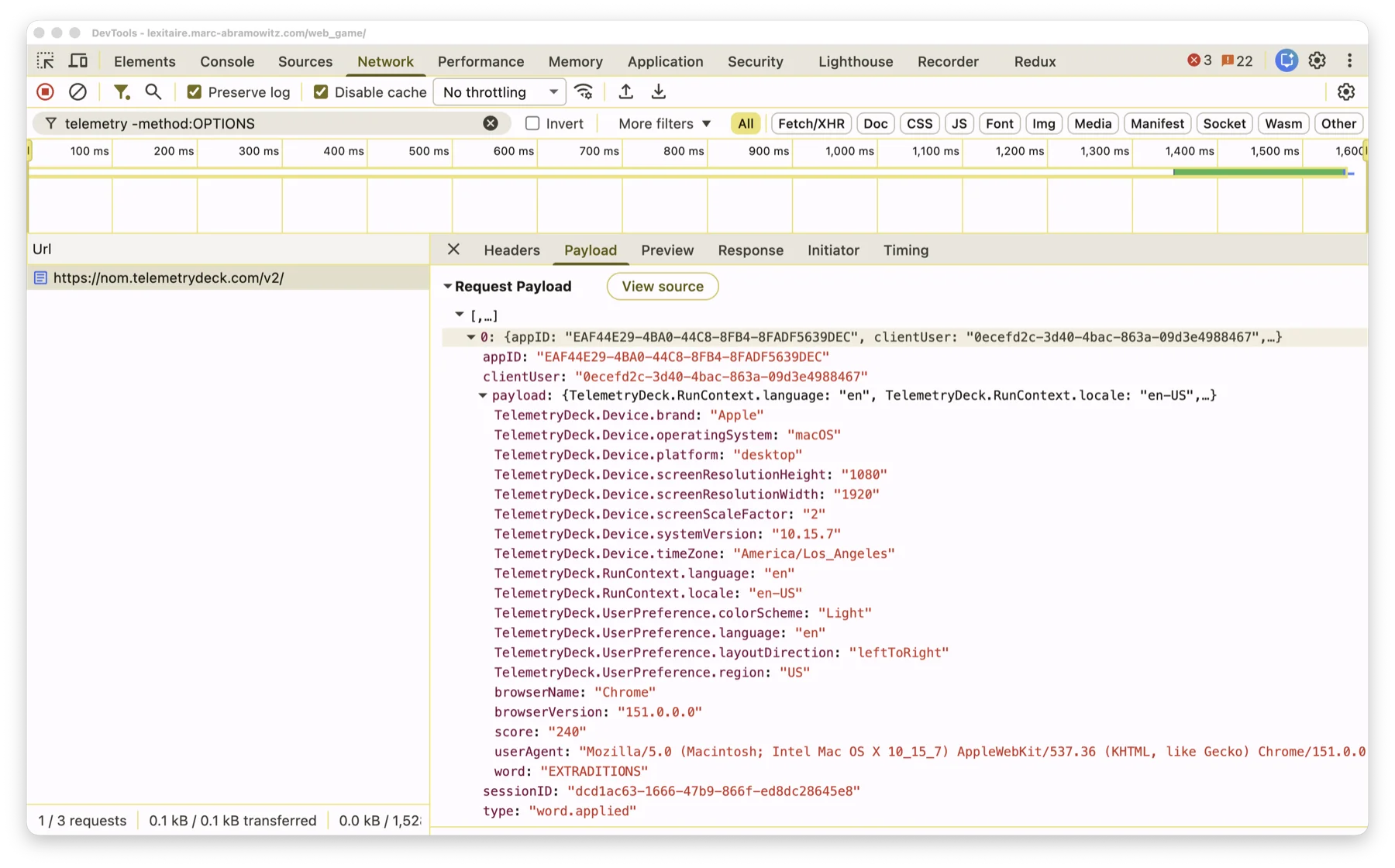
Transcribed as text, for anyone who'd rather copy/search it than read a screenshot:
[{
    "appID": "EAF44E29-4BA0-44C8-8FB4-8FADF5639DEC",
    "clientUser": "0ecefd2c-3d40-4bac-863a-09d3e4988467",
    "sessionID": "dcd1ac63-1666-47b9-866f-ed8dc28645e8",
    "type": "word.applied",
    "payload": {
        "TelemetryDeck.RunContext.language": "en",
        "TelemetryDeck.RunContext.locale": "en-US",
        "TelemetryDeck.UserPreference.language": "en",
        "TelemetryDeck.UserPreference.colorScheme": "Light",
        "TelemetryDeck.UserPreference.layoutDirection": "leftToRight",
        "TelemetryDeck.UserPreference.region": "US",
        "TelemetryDeck.Device.timeZone": "America/Los_Angeles",
        "TelemetryDeck.Device.screenResolutionWidth": "1920",
        "TelemetryDeck.Device.screenResolutionHeight": "1080",
        "TelemetryDeck.Device.screenScaleFactor": "2",
        "TelemetryDeck.Device.operatingSystem": "macOS",
        "TelemetryDeck.Device.systemVersion": "10.15.7",
        "TelemetryDeck.Device.platform": "desktop",
        "TelemetryDeck.Device.brand": "Apple",
        "browserName": "Chrome",
        "browserVersion": "151.0.0.0",
        "userAgent": "Mozilla/5.0 (Macintosh; Intel Mac OS X 10_15_7) AppleWebKit/537.36 (KHTML, like Gecko) Chrome/151.0.0.0 Safari/537.36",
        "word": "EXTRADITIONS",
        "score": "240"
    }
}]
Look at everything that's genuinely absent: no name ("Marc"), no IP address, no street address or city ("San Jose"), no device serial number, no advertising ID. The only location-shaped fields at all are region ("US") and timeZone ("America/Los_Angeles" — the whole Pacific time zone) — both broad enough to be shared by tens of millions of people, nowhere near enough to place anyone in a specific city. clientUser stayed the same as an earlier capture on this page taken from the same browser profile — expected, since it's a stable per-install identifier, not a coincidence or a leak. sessionID, on the other hand, is different every time, since it resets on every page load.
Curious enough to check this yourself? Here's exactly how this screenshot was captured — no special tools needed, just your browser's own DevTools.
Note what's missing in both examples above: no name, no raw timestamp of the play itself (TelemetryDeck stamps its own receipt time server-side, not something the app sends). The word and score themselves are present here, on purpose — see above.
Turn this off anytime on iPhone, iPad, or Apple TV: Settings → "Share Anonymous Analytics". See the Privacy Policy for the full, plain-language version of all of this.