Why this is easy for the browser version
Native apps (iPhone/iPad/Apple TV) need a TLS-intercepting proxy to see this, since the request leaves the device already encrypted and DevTools has no window into it. The browser version has no such wall: your browser is both the thing sending the request AND the thing that can show it to you, decrypted, before it ever leaves. That's exactly what its Network panel is for.
Steps
- Open mintyfreshapps.com/lexitaire/web_game/ in Chrome, Firefox, Safari, or Edge.
- Open DevTools:
Cmd+Option+Ion a Mac,F12orCtrl+Shift+Ion Windows/Linux, or right-click anywhere on the page → Inspect. - Click the Network tab in the DevTools panel.
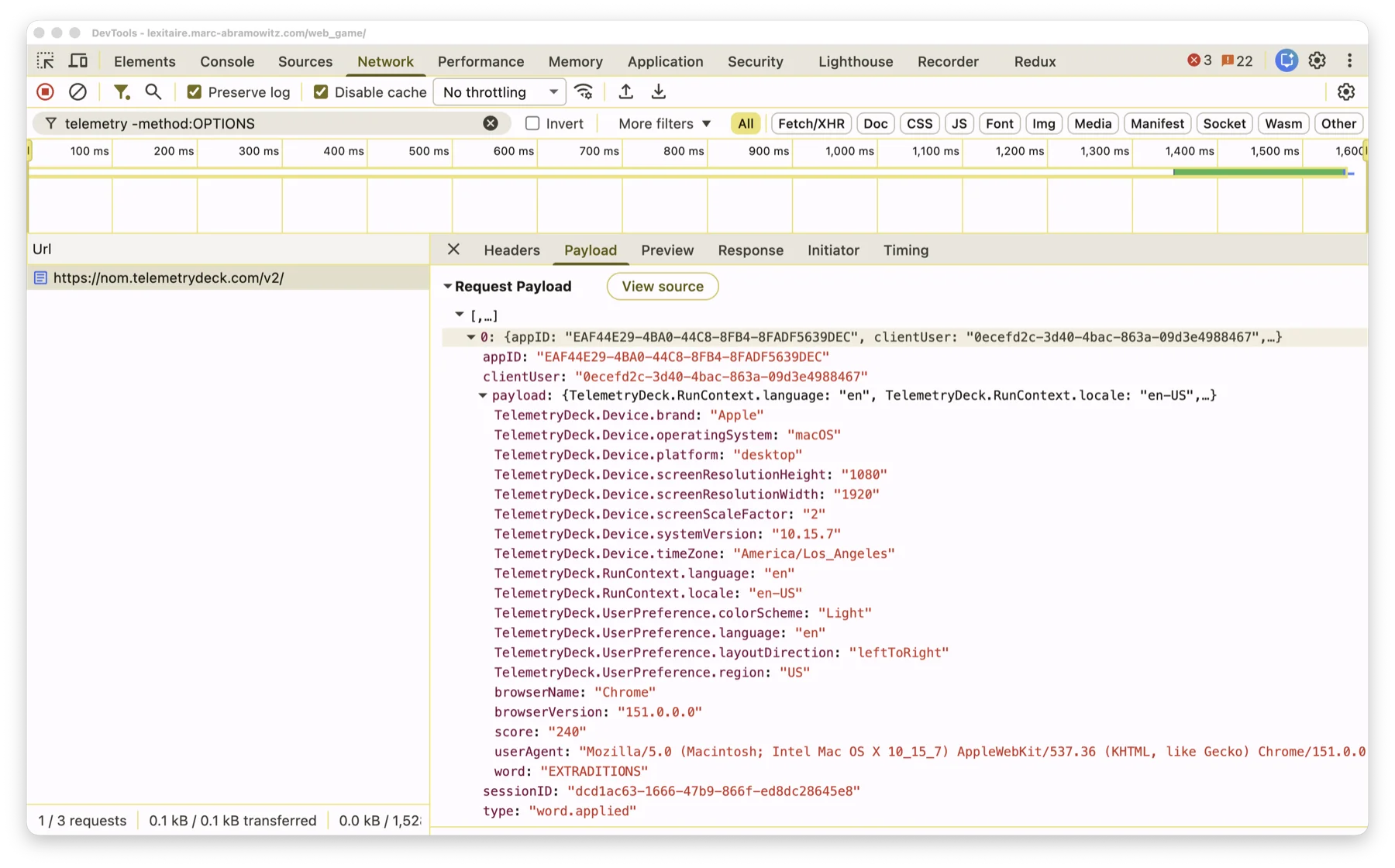
- (Optional but helpful) Type
telemetry -method:OPTIONSinto the Network panel's filter box, so only TelemetryDeck's own requests show up — the-method:OPTIONSpart hides the browser's CORS preflight checks, which aren't the actual signal. - Back in the game, tap tiles to spell any word, then tap the score circle to apply it.
- A new request to
nom.telemetrydeck.comshould appear in the Network list within a second or two. Click it. - Click the Payload tab (older browsers may call this Request) in the detail pane that opens. Click view source (or the equivalent raw-text toggle) if you'd rather see the flat JSON than the expandable tree view.
What you should see: a JSON array containing one object with appID, clientUser, sessionID, type, and a payload object holding everything else. The word and score you just played will be right there in plain text, in the word and score fields. Everything else is TelemetryDeck's own standard set of coarse device/browser info (see the Analytics Details page for the full breakdown of what each field means) — no name, no IP address, no device identifier, no matter how closely you look.
A couple of things you might notice
- There are usually a few TelemetryDeck requests per session, not just one —
app.launch/game.startedfire earlier,game.finishedfires when a game ends.word.appliedis the one to look for right after applying a word. clientUserstays the same across visits from the same browser (it's a stable per-install identifier, generated once and reused) — that's expected, not a bug or a leak.- If you have a privacy/ad-blocking extension that blocks analytics domains outright, you won't see any request at all — that's the extension working as intended, not Lexitaire failing to send one.
- Turn this off anytime in Lexitaire's own Settings ("Share Anonymous Analytics") if you'd rather not send it in the first place — see the Privacy Policy.